________________________________________________________________
Discussion about all the previous and latest technology in the world. Computers, Cars, Phones, Fashion, Models, Magazines, ect.....
Thursday, October 4, 2012
Purple Haze While Taking Photos With iPhone 5 Camera
Have you noticed the purple haze while taking photos with your iPhone 5 camera? You're not imagining, as we've also noticed the issue and quite a few iPhone 5 users are complaining about it in Apple support forums.
The problem has been observed when you aim the iPhone 5 camera towards the sun or bright light source. If you then move the camera so the light source is off screen, a purple halo effect can be seen through the camera. If you take a picture under these conditions, the halo effect also shows up on the pictures.
This thread of AnandTech Forum indicates that the issue is affecting several iPhone 5 users. AnandTech Forum member Kaido who started the thread to discuss the issue writes:
This is a thread discussing the issue of excessive purple light flare on the iPhone 5. It has been determined that many cameraphones, including the iPhone 4S, share the problem of purple haze around bright light sources, especially when those bright light sources are just barely off-screen. The problem is that the iPhone 5 exhibits more light bloom with a purple tint than other phones, to the point where it is affecting image quality.
He has posted some side-by-side photos taken using an iPhone 5, iPhone 4S and Nikon D300, which clearly highlights the issue:


You can follow these steps to see if you're facing this issue:
1. Aim your iPhone 5 camera towards a bright light source (CFL, incandescent, sun) 2. Move the camera so the light source is off-screen (especially on the shorter sides of the screen) 3. See if you experience a purple halo - either flare or haze (see sample pictures below)
Apple support told an Gizmodo reader that it's a normal behavior for iPhone 5's camera:
“Our engineering team just gave me this information and we recommend that you angle the camera away from the bright light source when taking pictures. The purple flare in the image provided is considered normal behavior for iPhone 5′s camera.”
It definitely doesn't seem like a "normal behavior" as we didn't notice this issue on the iPhone 4S.
It is not clear if the issue is due to a software bug or it is a hardware related issue. There are speculations that the issue could be due to iPhone 5's new sapphire lens cover or due to a new coating on the iPhone 5′s camera. According to a TechCrunch reader and photographer the issue could be addressed with a firmware update:
As many others have stated, this kind of thing happens very frequently in cameras of all types. I actually remember there being a firmware update to my Canon 7D to address this issues with certain less and lighting combinations. It’s a result of certain light frequencies being reflected/refracted in the lens from the off-angle light source. It might look like lens flare on a larger glass, but on something this thin it’s probably always going to look like a purple haze. You simply cannot beat the laws of physics. High end DSLRs have whole image processors a hell of a lot more advanced than the one in a cellphone dedicated to removing this kind of thing. But it still shows up from time to time, especially with new glass.
Let's hope that Apple can fix the issue in the next iOS software update as it's quite annoying.
Here’s The Reason Samsung Wants The $1 Billion Verdict Favoring Apple To Be Thrown Out
Samsung has finally figured out the reason the judge should throw out the $1 billion verdict, and its not because software patents for things like "pinch and zoom," "double-tap to zoom," "bounce back" etc. shouldn't exist in the first place.
BusinessWeek reports that Samsung has filed a request to a judge for the $1 billion verdict favoring Apple to be thrown out as the jury foreman Velvin Hogan failed out to disclose a lawsuit and his personal bankruptcy.
Business Week reports:
Samsung said foreman Velvin Hogan was asked during jury selection whether he’d been involved in lawsuits and didn’t tell the judge that he had filed for bankruptcy in 1993 and had been sued by his former employer, Seagate Technology Inc.
Samsung has a “substantial strategic relationship” with Seagate and the lawyer who filed the complaint against Hogan is married to an attorney who works for the firm that represented Samsung in the trial against Apple, the Suwon, South Korea-based company said in a filing yesterday in federal court in San Jose, California.
“Mr. Hogan’s failure to disclose the Seagate suit raises issues of bias that Samsung should have been allowed to explore,” Samsung said in its request for a new trial. The company also said Hogan’s public statements after the verdict suggest he failed to answer the court’s questions “truthfully” to “secure a seat on the jury.”
Hogan in a phone interview with Business Week said that the court instructions for potential jurors required disclosure of any litigation they were involved in, within the last 10 years. He clarified that since the bankruptcy and related litigation involving Seagate were back in 1993, he did not feel the need to disclose it.
“Had I been asked an open-ended question with no time constraint, of course I would’ve disclosed that,” Hogan said, referring to the bankruptcy and related litigation. “I’m willing to go in front of the judge to tell her that I had no intention of being on this jury, let alone withholding anything that would’ve allowed me to be excused.”
Hogan said that it was a honor being selected as the juror, especially since the suit was related to his job as an electrical engineer. Jurors had elected him as the foreman based on his experience. He wonders whether Samsung let him in the jury just to have an excuse for a new trial if it didn’t go in their favor.
It seems quite bizaare that Samsung is requesting the verdict to be thrown out for this reason. What do you think? Sound off in the comments.
Apple reportedly using its retail employees to improve iOS 6 Maps data
Apple got itself in a pickle with iOS 6 Maps. After ending its mapping relationship with Google, the company put together its own backend to Maps, only to have it universally panned. Misplaced landmarks, missing towns, and melted bridges are some of the more egregious examples of the app's shortcomings.
After CEO Tim Cook apologized to customers, it appears that Apple is trying a novel approach to the problem. MacRumors reports that the company is trying to improve the mapping data by tapping into its army of nearly 40,000 Apple Store employees.
Details are scant on Apple's methods, but participating stores will reportedly commit 40 hours of weekly staff time to the project. They will "manually examine" their respective areas' mapping data, and submit corrections to an internal Apple database.
Smart, but will it be enough?
Will Geniuses be piloting Apple Street View cars? (digitally altered)
Could using Apple Store employees be a stroke of genius? Unlike past issues Apple has faced (like antennagate or MobileMe), Maps' problems can't be fixed from an office in Cupertino. The data will improve gradually as more iPhone owners use iOS 6 Maps, but Apple would love to expedite that process. With nearly 400 retail stores spread across the globe, this approach could cover a lot of ground.
Apple still has its hands full with Mapgate, and it isn't clear whether creative solutions like this will change that. In the meantime, those having problems with iOS 6 Maps can try App Store alternatives like Waze or Mapquest, or simply use Google's HTML5 web app.
What do you think? Will an army of Geniuses significantly help Apple's Maps fiasco? Or is the problem too big for short-term results? Let us know in those comments!
Source [GizMag]
Wednesday, October 3, 2012
iPhone 5 vs. Galaxy S3 review: Who wins the battle between the two hottest smartphones on the market?
After endless rumors, Apple’s latest smartphone — the iPhone 5 — is finally out.
Rather than just do a straight iPhone 5 review, I’ll address something more topical — the hot topic that’s being discussed everywhere right now, including coffee shops, television ads and everywhere online: Which smartphone is better — the brand new iPhone 5, or the recently released Samsung Galaxy S3?
I happened to have my hands on both at the same time (a Verizon iPhone 5, and an AT&T Galaxy S3), so I’ll run down the comparisons between the two and let you know how the two most well-known super-phones on the market compare.
LOOKS
First, let’s talk about screen size. The iPhone 5 has grown, it’s up to 4 inches; the first size upgrade since the phone debuted. This means a taller, larger screen that iPhone fans have been waiting for. This is better, but not as much as I would have wanted. Even at 4 inches, I find the keyboard to be a bit small for typing.
If you want real size, the GS3 has the numbers – 4.8 inches to be exact. This is more real estate for your viewing pleasure, though some folks might not want a phone that big. It’s up to each person to decide how big is too big, but I think most people will be just fine with a 4.8 inch screen, which is a little more manageable than the 5-inch plus screen on phones like the Galaxy Note and the LG Intuition.
In terms of materials, the iPhone wins this battle; it’s more solid and less plasticky, an Apple hallmark. But don’t think the GS3 is a slouch here. It will withstand some drops too, it’s just not quite as sturdy as the iPhone. To be safe, with either phone, get a case.
Slimness is close, but iPhone wins out by a hair … 0.30 inches for iPhone, 0.34 inches for GS3. The difference is negligible, as both are very slim and light.
Full specs are as follows: The iPhone comes in at 4.87 inches high, 2.31 inches wide, .3 inches thick and a weight of 3.95 ounces. The GS3 is 5.38 inches high, 2.78 inches wide, .34 inches thick, and weighs 4.7 ounces.
SCREEN
In terms of what you’ll see on screen, both devices offer sharp visual quality for viewing media and photos and video.
With the iPhone 5, you get their well-known Retina display on the 4-inch touchscreen.
There is a 1136x640 resolution, or 326 ppi (pixels per inch). There is a fingerprint-resistant coating on the front, but it didn’t really work in my experience. I still found myself wiping my fingerprints off the phone regularly.
In the GS3, you get a slightly better resolution of 1280x720, but due to the larger 4.8-inch size the ppi is slightly less. The HD Super AMOLED screen on the GS3 is very bright and attractive.
This is one area where I would call it a push between the two phones. The numbers are slightly different, but both look amazing.
PROCESSOR
The iPhone 5, no exaggeration, is lightning quick. Apple did a bang-up job with its dual-core Apple A6 processor, and you won’t be waiting long to do anything.
But hold on, because the GS3 is definitely up to pace, in fact it’s even faster. Its 1.5 GHz dual-core Snapdragon processor is nothing to sneeze at (the European version is even better with a quad-core processor). Multitasking will not slow it down in the least, even if it involves intensive apps such as Pandora Radio or Netflix. (Side note: One benefit of Android over Apple’s operating system is that multitasking is much easier to manage on the Android OS than it is on an iPhone)
In the area of RAM, the iPhone 5 features 1 GB, but the GS3 features a whopping 2GB of RAM. This is going to become the new standard for smartphones, and the iPhone 5 will be seen as behind in this area, though Apple will argue its operating system requires less RAM to operate than the Android OS.
STORAGE
You can get the iPhone with various storage levels —- 16, 32 or 64 GB; of course, that’s what you get, no upgradability in the iPhones. The GS3 is available in 16GB or 32 GB options, plus it has a microSD slot, which allows for up to 64GB, so the potential for more storage space is there on the GS3. Realistically, though, most people don’t need to go past 64 GB, or even that high, especially with so much data and music, etc., stored in the cloud these days (For example, all your music could be stored online in iTunes or Google Music, so it wouldn’t take up space on your phone).
4G
The big news about the iPhone 5 is that it’s (finally) capable of accessing the 4G networks of its carriers, another example of Apple showing up fashionably late to the party. That is big news for Apple fans, who now will get faster downloads and uploads as a result.
But as Apple’s competitors are quick to point out, that’s old news for Android phone users. They’ve been using the faster 4G LTE networks for over a year now, so in this area Apple is just catching up to the Android competition.
The iPhone is offered on Verizon, AT&T, and Sprint, who all have their own 4G LTE networks. Verizon and AT&T’s networks are the most expansive right now, and Sprint’s is newer so its reach is limited.
The Galaxy S3 is available on all four major wireless networks – Verizon, AT&T, Sprint and T-Mobile. It’s basically the same phone on all four networks, other than some carrier-specific software that’s included on each version of the phone, plus the fact that it will access a different 4G network, depending which version you buy.
CAMERAS
More and more these days, people skip the standalone digital camera and rely on their smartphones. As a result, there are high expectations in this regard.
Good news: Both the iPhone 5 and the Galaxy S3 have fantastic cameras, and fantastic video quality too.
Both devices have an 8-megapixel camera in the rear, as well as crystal-clear 1080p HD video that looks amazing and life-like on replay. They do well in low light, for the most part, compared to previous versions of these phones.
In the area of front camera, which is used primarily for video chat, the GS3 does a little better with its 1.9-megapixel camera. The iPhone 5 front camera comes in at 1.2 megapixels. Both phones’ front camera feature 720p HD video quality.
Both phones have a great deal of editing/cropping/sharing ability in regard to photos, as was as various modes such as burst mode and panorama to choose from. To be fair, the Android phones have had the panorama shot for a while, and it’s now becoming available to iPhone users with the latest update to Apple’s operating system.
iPHONE CONNECTOR ISSUE
In addition to the change in size, a major update on the iPhone 5 is the new size of the charging connector – the newly named Lightning connector that is a lot smaller than all previous Apple chargers. A connector is included with your phone, but if you want to connect your iPhone 5 to your old iPhone accessories, you’ll need a new Lightning adaptor – which, in true Apple fashion, they’re willing to sell you online for only $30 (yes, a bit ridiculous I know).
Luckily for the Apple faithful, knockoffs usually come shortly after a new overprice adaptor is announced, but Apple should be ashamed of itself for this overcharging here like it always does for its silly adaptors. They probably cost $2 to make, and it’s simply price gouging. (Luckily for them, the most hardcore Apple fanboys/fangirls don’t care about their general trend of overpricing everything the company sells, for some strange reason I’ve yet to comprehend.)
MAPS
One big software change on the iPhone 5 is that Apple now relies on its own maps, and no longer uses Google maps. There have been some major bumps in the road for Apple in this transition, especially in Europe, where mapping is just way off. Even in the U.S., some folks aren’t happy with how the new maps work.
This is a work in progress, and a result of Apple trying to distance itself from its rivals (Google is behind the Android operating system, hence the distancing), so for now and probably a long time, the GS3 has the edge in terms of getting you where you need to go properly. If I were a user of the new iPhone, the downgrading of the navigation capability of my phone would be very annoying. They’d be better of just going online and visiting Google Maps and leaving the Apple navigation alone completely until they work out the bugs in this transition.
Point blank, Apple’s weakening of its maps feature is the biggest disappointment on the iPhone 5, and a big win for the Galaxy S3 in comparison, as Google Maps work wonderfully on it.
APPS
Of course, behind all this other mess, it’s really – for a lot of folks – all about the apps.
Apple, of course, was out with its iPhone before Android phones ever hit the market, so they got a big jump on the competition in terms of having better app selection. And it’s true that pretty much whatever you need to do with an app, Apple’s got you covered on the iPhone.
But that doesn’t necessarily mean the Android competition loses this battle. It may have gotten a later start, but in the past several years Google’s Android Market (now referred to as the Google Play Store) has grown by leaps and bounds, and I would say at this point it’s caught up to Apple’s App Store in terms of offering whatever you might need in the app department.
In the past, the apps battle was a clear win for Apple, but I think those days are over.
OPERATING SYSTEMS
This is really the big difference between these two phones.
Apple’s iPhone 5 runs the latest version of Apple’s operating system – iOS 6. This features integration with Apple’s ecosystem – iTunes, iBooks, etc. When you use an iPhone, you’re in Apple’s world. Some people like that, others don’t.
With the Galaxy S3, you get Android 4.0 (aka Ice Cream Sandwich), and an update promised soon to Android 4.1 (aka Jelly Bean), and you’re in Google’s world here – Google Maps, Google Voice, Gmail, etc.
The operating systems operate quite differently in my experience. I find the Android OS more easily maneuverable than iOS 6, for basic reasons such as the presence of a pull down menu listing your apps in use, and the presence of a back button on the phone instead of having to hunt for an arrow within each app to return to the previous screen. Other little things bother me about iOS 6, such as the more difficult steps you must take to sign out of some apps that are operating in the background.
Still, I know a lot of folks who love their iPhones and don’t complain about the user experience, so obviously we’re not all going to have the same opinion in this regard. This opinion about operating system preference, to me, is the decision you’ll make that will likely have the biggest impact in determining which of the two phones you prefer.
NFC
One feature that the GS3 has that the iPhone 5 does not is NFC, aka near-field communication, which allows users of phones that both have this feature to share certain things by simply tapping the phones together, and you can use it to pay for purchases. It’s a very cool feature, though not widely used yet, so I don’t think it will sway too many people from Apple to Android. But, it’s fair to mention that Apple is lagging behind in this exciting new area of smartphone technology, and if they’re smart they’ll make sure to add it on next year’s model.
CALL QUALITY
Call quality on these phones will, of course, depend on which network you are using and where you are calling to/from, but in my time with Verizon’s iPhone 5 and AT&T’s GS3, I didn’t experience any dropped calls or distortion or anything of that sort. It would appear to me that the issues previous versions of the iPhone have had with call quality are now pretty much gone.
BATTERY
4G phones are notorious for sucking up battery, but with proper management of your features like WiFi and Bluetooth, you can make them last longer.
Samsung’s GS3 slightly outlasted Apple’s iPhone in my testing, and both were among the better 4G phones I’ve seen so far. They got me through the day and then some, unless I was just going crazy with my app use.
NEW EARPODS
One small change on the iPhone 5 comes in the area of accessories, as a new variety of earphones are included — called EarPods. As you can guess, they fit better in your ear. Hardly revolutionary, but I suppose they do feel a little better in the ear.
SIRI VS. S VOICE
The star feature of the iPhone 4S was Siri, your personal assistant who will answer any question you ask – sometimes accurately, sometimes not. She’s a little better this time around, and still has a little wit in her, but Samsung also offers something similar on the GS3 – called S Voice. It’s got its own bugs, too, just like Siri, but both of them allow you to ask questions, open apps, make calls, etc.
Some consider S Voice to be a clone of Siri, but that’s for the courts to settle (Apple and Samsung will likely be suing each other into the next century over various copyright cases). To the user, I’ll just say this: Both Siri and S Voice do what they’re supposed to do – for the most part, but with a few hiccups that will likely be worked out on future updates. Siri maybe gets a slight advantage, but it’s not by much.
PRICES
The pricing for the iPhone 5 is the same on Verizon, AT&T and Sprint: With a new 2-year-contract, you pay $199 for the 16GB version, $299 for the 32GB version and $399 for the 64GB version.
Costs for the Samsung Galaxy S3 vary by carrier: On both Verizon and Sprint, it costs $199.99 for 16GB version, $249.99 for 32GB version, with new contract; on AT&T, it’s $199.99 for 16GB version (and refurbished GS3s are just $99.99) with a new contract; and on T-Mobile, prices are now $99.99 for 16GB version and $149.99 for 32GB version, with a new contract.
This is to be expected, as Apple never adjusts its pricing (at least until the next model comes out), but with the Android phones you can sometimes catch a break at the point of purchase. Personally, I think the $399.99 price out of pocket even with a contract is a bit ridiculous, but I doubt most people would go that route anyway, as 64GB is not needed by 90-some percent of buyers.
BOTTOM LINE
As Samsung and Apple battle in the courtroom over copyrights and the billions they are making, the battle between these two superphones is now officially under way, as the iPhone 5 is finally here to compete with the Galaxy S3, which had been dominating the market for the past several months.
My final verdict is that these phones are very close in overall performance and quality, but the undeniable truth is that the iPhone 5 is finally catching up to its Android competition – namely the Galaxy S3. Most specs are very close between the phones, but the Galaxy S3 has some features that you can’t do with iPhone (NFC) and better maps/navigation.
Both phones are very fast, have 4G access, great cameras and video, and it’s a safe bet to say these are the two best phones on the market right now. Really, in the end, it all comes down to what is your favorite operating system and how big you want your phone to be.
Some people (aka Apple fanboys/fangirls) swear by Apple and herald the greatness of iOS 6, which I recognize does have some solid upgrades. But others (aka Fandroids) believe that Android’s OS is far superior and easier to use.
In my book, the Galaxy S3 is slightly ahead in this battle, but those who swear by the iPhone likely won’t agree with me. Still, I recommend they check out the alternatives though before committing to the iPhone 5.
The iPhone may still be a great phone, but we’re long past the day where it was assumed to be the best phone on the market. That only lasted a couple years, really. This time around, the Galaxy S3 gives the iPhone 5 a good run for its money, and is arguably better, so I would recommend all new smartphone buyers contemplating buying either phone try out both and see what side of the argument they choose to be on.
________________________________________________________________
iPhone 5 vs. Galaxy S3 review: Who wins the battle between the two hottest smartphones on the market?
![]() |
Apple's iPhone 5 (left) and Samsung's Galaxy S3 (right) are the two hottest phones out right now. Tech Time writer Matt Myftiu prefers the Galaxy S3, but says that in the end it comes down to your preference of operating system and how large you want your phone to be.
First, let’s talk about screen size. The iPhone 5 has grown, it’s up to 4 inches; the first size upgrade since the phone debuted. This means a taller, larger screen that iPhone fans have been waiting for. This is better, but not as much as I would have wanted. Even at 4 inches, I find the keyboard to be a bit small for typing.
In terms of what you’ll see on screen, both devices offer sharp visual quality for viewing media and photos and video.
The iPhone 5, no exaggeration, is lightning quick. Apple did a bang-up job with its dual-core Apple A6 processor, and you won’t be waiting long to do anything.
You can get the iPhone with various storage levels —- 16, 32 or 64 GB; of course, that’s what you get, no upgradability in the iPhones. The GS3 is available in 16GB or 32 GB options, plus it has a microSD slot, which allows for up to 64GB, so the potential for more storage space is there on the GS3. Realistically, though, most people don’t need to go past 64 GB, or even that high, especially with so much data and music, etc., stored in the cloud these days (For example, all your music could be stored online in iTunes or Google Music, so it wouldn’t take up space on your phone).
The big news about the iPhone 5 is that it’s (finally) capable of accessing the 4G networks of its carriers, another example of Apple showing up fashionably late to the party. That is big news for Apple fans, who now will get faster downloads and uploads as a result.
More and more these days, people skip the standalone digital camera and rely on their smartphones. As a result, there are high expectations in this regard.
In addition to the change in size, a major update on the iPhone 5 is the new size of the charging connector – the newly named Lightning connector that is a lot smaller than all previous Apple chargers. A connector is included with your phone, but if you want to connect your iPhone 5 to your old iPhone accessories, you’ll need a new Lightning adaptor – which, in true Apple fashion, they’re willing to sell you online for only $30 (yes, a bit ridiculous I know).
One big software change on the iPhone 5 is that Apple now relies on its own maps, and no longer uses Google maps. There have been some major bumps in the road for Apple in this transition, especially in Europe, where mapping is just way off. Even in the U.S., some folks aren’t happy with how the new maps work.
Of course, behind all this other mess, it’s really – for a lot of folks – all about the apps.
This is really the big difference between these two phones.
One feature that the GS3 has that the iPhone 5 does not is NFC, aka near-field communication, which allows users of phones that both have this feature to share certain things by simply tapping the phones together, and you can use it to pay for purchases. It’s a very cool feature, though not widely used yet, so I don’t think it will sway too many people from Apple to Android. But, it’s fair to mention that Apple is lagging behind in this exciting new area of smartphone technology, and if they’re smart they’ll make sure to add it on next year’s model.
Call quality on these phones will, of course, depend on which network you are using and where you are calling to/from, but in my time with Verizon’s iPhone 5 and AT&T’s GS3, I didn’t experience any dropped calls or distortion or anything of that sort. It would appear to me that the issues previous versions of the iPhone have had with call quality are now pretty much gone.
4G phones are notorious for sucking up battery, but with proper management of your features like WiFi and Bluetooth, you can make them last longer.
One small change on the iPhone 5 comes in the area of accessories, as a new variety of earphones are included — called EarPods. As you can guess, they fit better in your ear. Hardly revolutionary, but I suppose they do feel a little better in the ear.
The star feature of the iPhone 4S was Siri, your personal assistant who will answer any question you ask – sometimes accurately, sometimes not. She’s a little better this time around, and still has a little wit in her, but Samsung also offers something similar on the GS3 – called S Voice. It’s got its own bugs, too, just like Siri, but both of them allow you to ask questions, open apps, make calls, etc.
The pricing for the iPhone 5 is the same on Verizon, AT&T and Sprint: With a new 2-year-contract, you pay $199 for the 16GB version, $299 for the 32GB version and $399 for the 64GB version.
As Samsung and Apple battle in the courtroom over copyrights and the billions they are making, the battle between these two superphones is now officially under way, as the iPhone 5 is finally here to compete with the Galaxy S3, which had been dominating the market for the past several months.
________________________________________________________________
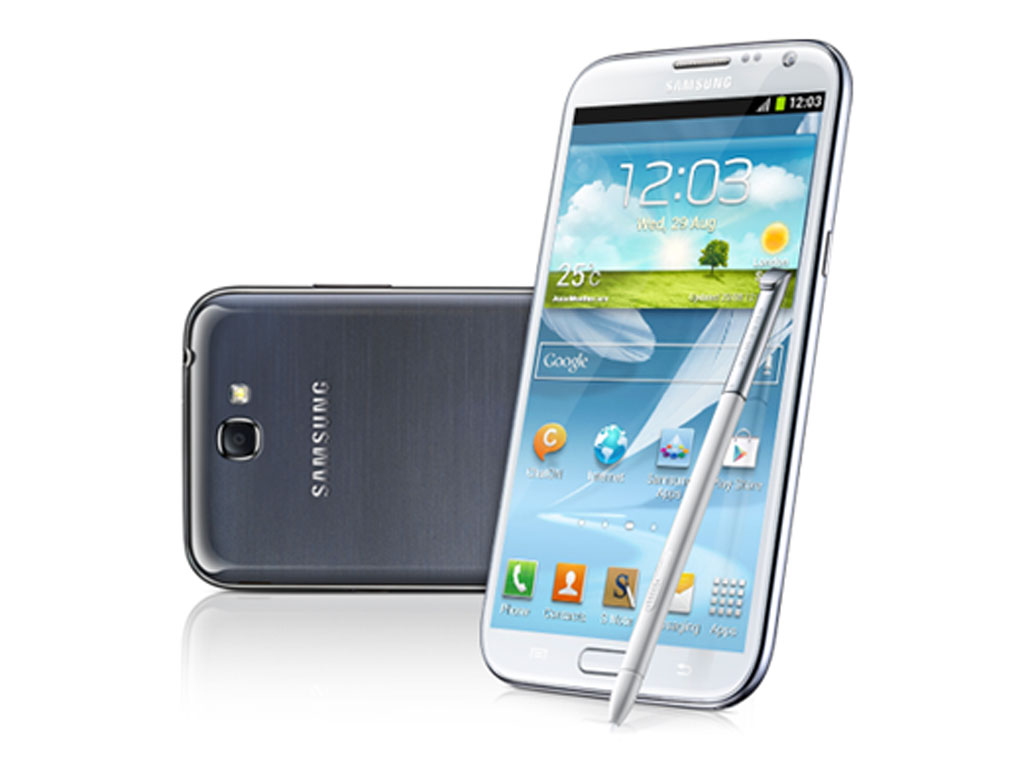
Galaxy Note 2 Smart Rotation Makes Using Your Device Less Frustrating
We’ve all experienced this before —
You’re browsing through your favorite website, checking out that new
book a friend told you about or just browsing through a website on your
smartphone. Suddenly, you get the desire to lie down but want to
continue reading. Everything’s fine at first but then you turn on your
side… And the screen rotates. The device keeps doing that with the
slightest movement and you just end up being frustrated. Sure, you’re
probably laughing right now thinking this another one of those
“first world problems” but if you’ve experienced it, you know it’s
pretty annoying. The good news is that the Samsung Galaxy Note 2 wants
to make this petty issue go away with its Smart Rotation feature.
The Galaxy Note 2′s Smart Rotation is similar to the Galaxy S
III’s Smart Stay system. It’s a feature that uses the front-facing
camera of your device to determine the orientation of your face. It then
uses that information to match your screen’s orientation accordingly
using a built-in sensor. What this means is that regardless of what
angle you’re reading, the Galaxy Note 2 will recognize which direction
is the right way up and keep your screen that way. The only catch is
that since it needs the front-facing camera to work, some ambient light
is necessary for it to detect you and work its camera trickery.
Wondering how you can access this feature on your Galaxy Note 2? All you have to do is go to Settings > Display and voila, you can switch it on or off! Again, it’s not the most life-changing feature out there but I’m sure it’s one you’ll be glad your Galaxy Note 2 has.
Have you tried the Samsung Galaxy Note 2 yet? Is it the best device out in the market? Share your thoughts in the comments below!
Wondering how you can access this feature on your Galaxy Note 2? All you have to do is go to Settings > Display and voila, you can switch it on or off! Again, it’s not the most life-changing feature out there but I’m sure it’s one you’ll be glad your Galaxy Note 2 has.
Have you tried the Samsung Galaxy Note 2 yet? Is it the best device out in the market? Share your thoughts in the comments below!
________________________________________________________________
Subscribe to:
Posts (Atom)